Capture the agreement
Select a Jira project. Enter contract value, internal cost, commercial rate and target margin. Save the visible issue estimates as your baseline.
FOR AGENCIES & FIXED-PRICE DELIVERY TEAMS · JIRA CLOUD
A bigger backlog should start a conversation about the budget. Capture your agreed scope, spot changes in Jira, and see what they mean for forecast margin.
Available for Jira Cloud · 30-day free trial · View pricing
A focused workflow. From the agreed baseline to a recorded commercial decision.
Built with Atlassian ForgeTHE PRODUCT, IN THREE MOMENTS
A guided walkthrough using real ScopeProfit screens and fictitious data. No Jira access needed to explore the example.
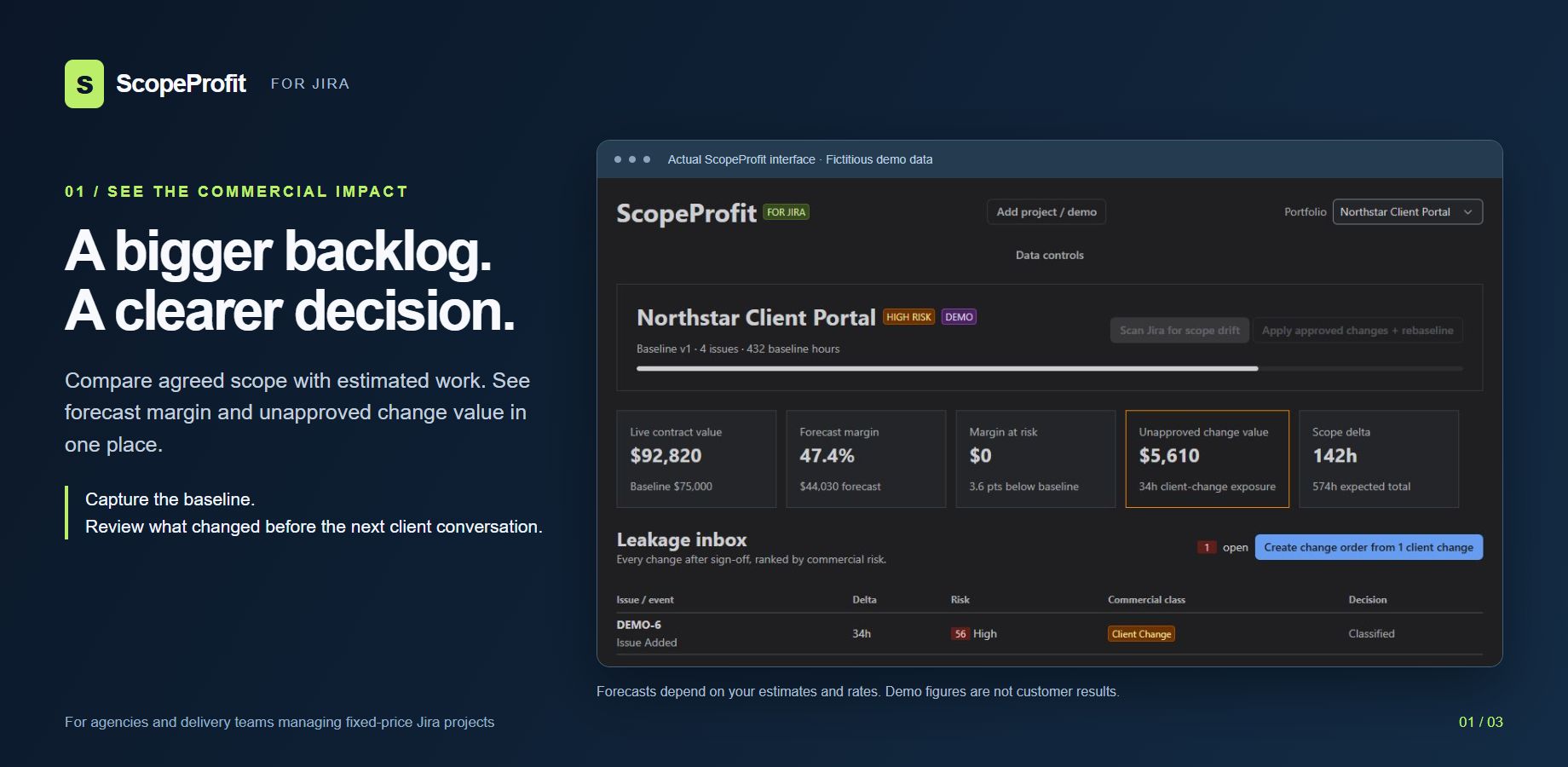
Select an image to inspect it at full size. This walkthrough shows the product; it does not connect to your Jira or change project data.
IS IT A FIT?
Use ScopeProfit when your team works in Jira, agrees a fixed fee and estimates delivery in hours. Bring the scope change, its estimated cost and the recorded decision into the same review.
Try the isolated demo. Then capture one project's baseline and review a real scope change using your own rates.
Manual scans, up to 200 visible issues per project. Original time estimates are required for meaningful forecasts. Approvals remain internal records; obtain client consent through your normal process.
Check setup requirements ↓THE WORKFLOW
Designed for agencies, implementation partners and delivery teams managing fixed-price work.
Select a Jira project. Enter contract value, internal cost, commercial rate and target margin. Save the visible issue estimates as your baseline.
Scan Jira when scope changes. Review added issues, estimate changes, reopened work and moved due dates. If previously saved issues are no longer accessible, the app blocks the saved project to protect restricted information.
Classify the work, assemble a change order and record approval or decline. Apply approved changes to the baseline when appropriate.
COMMERCIAL CONTEXT, INSIDE JIRA
QUICK START
Ask your Jira administrator to start a trial from Atlassian Marketplace, then follow the steps below.
You need Jira Cloud, Browse Projects and Administer Projects permissions. This version supports up to 200 visible issues per project and USD, EUR, GBP, CAD and AUD.
Use original time estimates. Story points and worklogs are not converted into hours. Confirm that the baseline captures the scope you intend to track.
Scans are manual. Approval records are internal: the app does not send quotes, collect client signatures, issue invoices or receive payments. It does not replace your contract, accounting records or cost tracking.
Access checks have been tested with a separate account, including a saved issue that becomes restricted. These checks are not an independent security certification. Install the public release from Atlassian Marketplace.
TRUST & SUPPORT
Project identifiers and names; issue keys, summaries, original estimates, status categories, due dates and version identifiers; entered contract values and rates; scope events, baseline versions and commercial decisions. New change-order decisions include the Atlassian account identifier of the user recording the decision.
ProfitSignal Labs is the product brand of Jon Ander Irazusta Iribar. The app runs on Atlassian Forge and uses Forge-hosted storage. The current manifest declares no external network destinations. This website contains no advertising or analytics tracker in its application code.
Track setup questions and product issues in our support portal. Choose ScopeProfit or Dependency Signal in your description, include the app version and steps to reproduce, and use fictional or redacted examples. Never attach passwords, API tokens, private Jira exports or unnecessary personal information.
Financial project actions are checked on the server against the signed-in user's Jira project permissions. Demo records contain fictitious data.
Contact support@profitsignallabs.dev for setup questions, errors or data requests. Support hours: Monday–Friday, 09:00–18:00 Europe/Madrid. Our general response target is 24 hours. Contractual response deadlines remain as stated in the customer terms; response time is not a resolution guarantee. For Marketplace customers, contractual response deadlines are five business days, or 24 hours when Atlassian identifies an issue as critical. Response times do not promise resolution within that period. No additional uptime SLA is offered.
When reporting an issue, provide the app action, approximate time and error message. Never include passwords, API tokens or unnecessary customer information.
The app data described above is held in Atlassian Forge. Authorized project administrators can erase saved ScopeProfit project records through Data controls without deleting Jira issues. An interrupted erasure can be resumed.
This website is an informational product page hosted with OpenAI Sites on Cloudflare infrastructure. Its code has no forms, advertising or analytics trackers; hosting infrastructure processes technical requests to deliver and protect the website. Email enquiries are handled separately through Porkbun email hosting. Please do not send customer issue content, passwords or API tokens.
Read our Privacy notice and Customer terms and Data Processing Agreement. ScopeProfit is not currently offered for purchase.
ScopeProfit is available on Atlassian Marketplace. Trials, subscriptions and payments are handled by Atlassian; this website does not collect payment.
Use is subject to the customer terms, Jira permissions and documented product limits. Demonstration values are fictional and do not represent sales or customer results.